

Smart warehouse gate and asset tracking with UHF RFID
Tagged items are detected automatically at the warehouse door. The system decides whether the movement is inbound or outbound. Every movement appears on screen instantly and is reported.
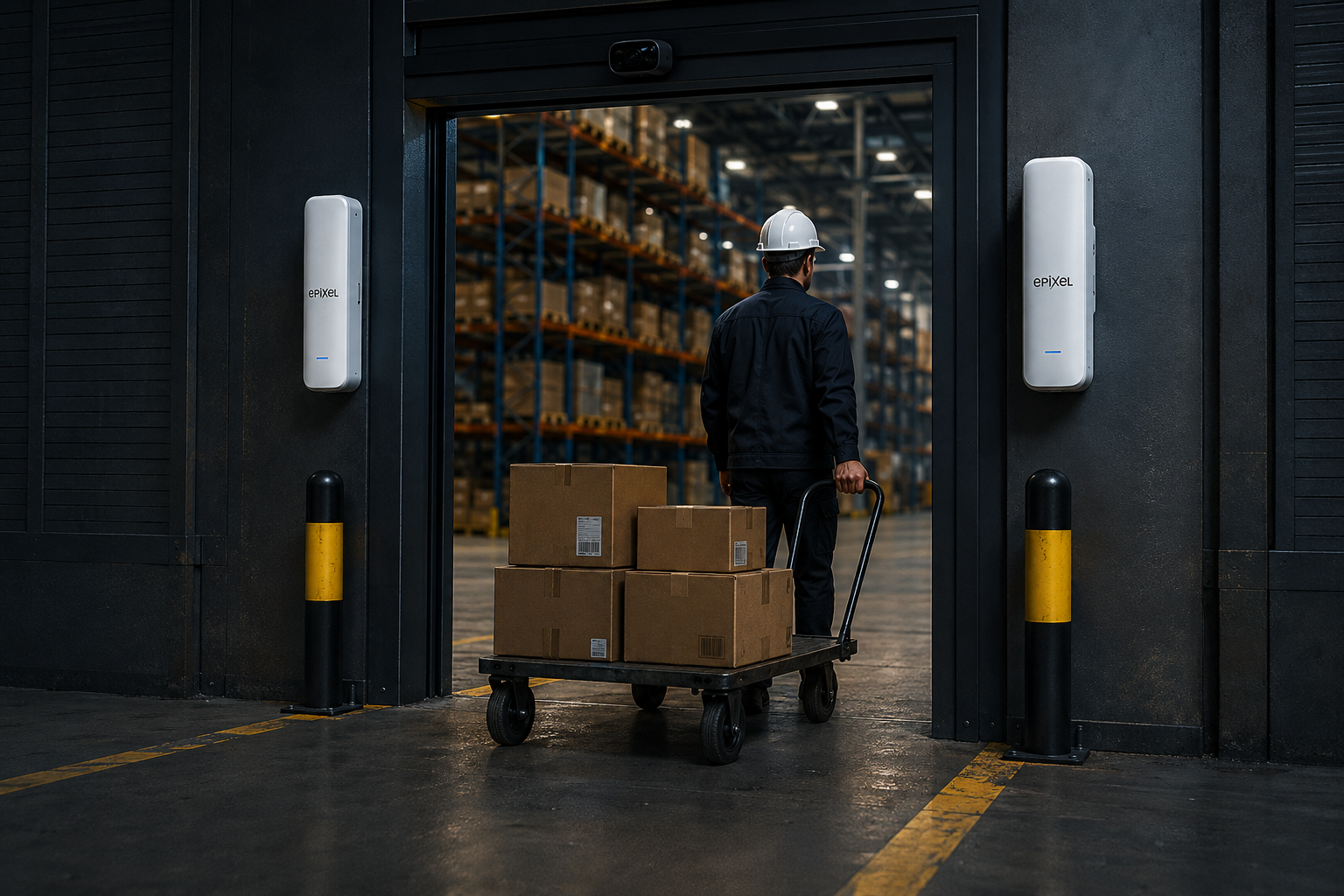
Walking through the door is enough
Two-sided UHF antennas read every tagged item passing through the door. Direction comes from the order of the readings: an item coming in is written as inbound, an item going out as outbound. Staff do not need to do anything.
UHF antennas placed on both sides of the door cover the passage area completely.
The system decides inbound or outbound, so the item is recorded with the right movement.
An optional camera provides visual evidence.
How it works
Antennas at the door read the passing item's UHF tag without contact.
The order of the readings determines whether the movement is inbound or outbound.
The movement shows up instantly; it is clear who took what.
Every movement is recorded and periodic reports come from the panel.
Every item is known by its own tag
A passive UHF tag runs on the radio energy the reader emits; no battery needed. The EPC number on the tag identifies the item uniquely, and hundreds of tags can be read at once.
Door mounted, maintenance free reader
Mounted on the door frame or a post, the reader unit scans the passage area continuously. It needs no intervention after installation.
Highlights
Every passage shows up in the panel immediately, so you know which item left when and when it came back.
A camera at the door attaches the footage of the passage to the movement record, providing evidence when it is disputed.
Web panel
Inventory summary and recent movements on one screen.
Where is it used?
At every door where the passage needs to be on record.
Record when drills, breakers and socket cases leave the warehouse and when they return; cut down on lost equipment.
Count parcels passing the dispatch door without counting them one by one; confirm instantly that the load went out complete.
Track raw material and work-in-progress movements automatically as they enter and leave the production line.
Follow equipment sent for maintenance as a separate state; see how long each device stayed in the field.
Put every movement in your warehouse on record.
End-to-end solution including installation, tagging and panel access.
UHF RFID Warehouse Tracking System and Automatic Gate Control
E-Pixel UHF Radar is a warehouse tracking system and RFID gate control solution that reads tagged items contactlessly with UHF RFID antennas installed at the warehouse door. UHF RFID reader units are positioned on both sides of the doorway so the whole passage area is covered; when an item passes through, its RFID tag is read automatically, the reading order determines entry or exit, and the movement appears in the web panel instantly. In this RFID warehouse tracking system staff do not scan barcodes, tick off lists or press buttons; the inventory tracking record is created by the passage itself.
How passive UHF RFID technology works
The warehouse tracking system uses passive UHF RFID tags. A passive RFID tag has no battery; it is powered by the radio frequency energy radiated by the UHF RFID reader antenna and returns its own EPC identity. RFID tags therefore never need charging or replacement, last a long time and stay permanently on the item. Tag identities follow the 96-bit EPC standard, so every item under inventory tracking has a unique identifier. The clearest advantage of UHF RFID technology over barcodes is that it needs no line of sight and reads hundreds of RFID tags at once. When a pallet or loaded trolley passes the warehouse door, every tag inside it is read in a single pass.
Entry and exit direction in the warehouse tracking system
In RFID warehouse tracking, knowing an item was read is not enough; the real question is whether it entered or left the warehouse. E-Pixel UHF Radar resolves this by evaluating the reading order of the UHF RFID antennas on either side of the door. Direction is set by which antenna read first and written to the warehouse tracking record as an entry or exit. This makes clear both when an item left and when it returned. Inventory tracking status is derived automatically: every item is tracked as in stock, in the field or under maintenance, and stays current without a manual stock count.
RFID inventory tracking web panel and reporting
All warehouse tracking movements are collected in a web-based panel with an inventory tracking summary, a list of recent movements with timestamps, item-level history and periodic reports. The panel is multi-user with authorisation, so warehouse staff and management work at different access levels. When an optional gate camera is added at the warehouse door, the image captured at the moment of passage is linked to the RFID movement record. In cases of lost equipment or a shipment dispute, this places visual evidence alongside the warehouse tracking record and allows the movement to be reviewed later.
RFID tracking on construction sites, logistics and production
In site and field equipment tracking, the departure and return of hand tools such as drills, breakers and socket sets is recorded by the RFID warehouse tracking system, reducing equipment loss. In logistics and dispatch, parcels passing the warehouse door are counted without being counted one by one and a complete load is verified instantly. In a production warehouse, raw material and semi-finished goods movements are tracked automatically at the line. In technical service and maintenance, equipment sent for repair is tracked as a separate inventory tracking status and how long each device stayed in the field is reported. The common theme is taking counting away from people and handing it to the passage itself.
UHF RFID versus barcode in warehouse tracking
In a barcode-based warehouse tracking system each item must be scanned individually, the reader must face the label directly and a member of staff must do the work. UHF RFID needs no line of sight; an item is read inside a box, in the middle of a pallet or while carried by hand. Reading hundreds of RFID tags at once means a dispatch load passing the gate is counted in seconds. The most common problem in barcode inventory tracking, the skipped or forgotten record, disappears in an RFID warehouse tracking system because the record does not depend on a person. Automatic direction detection is also something a barcode system cannot offer.
Warehouse tracking system installation and maintenance
The system has four components: UHF RFID reader units on both sides of the door, passive UHF RFID tags on items, an optional gate camera, and the inventory tracking web panel. UHF RFID readers are mounted on the warehouse door frame or on a post and need no modification to the existing doorway. Because RFID tags contain no battery, no routine maintenance is required after installation. Daily operation of the warehouse tracking system requires no change in staff habits: an employee picks up an item and walks through the door while the record is created in the background. The forgotten or skipped record of manual inventory entry disappears.
Frequently Asked Questions About the UHF RFID Warehouse Tracking System
Do the RFID tags have batteries?
No. The warehouse tracking system uses passive UHF RFID tags. They are powered by the energy radiated by the UHF RFID reader antenna, contain no battery and need no battery change.
How many items can be read at once?
Hundreds of RFID tags simultaneously. A full pallet or dispatch trolley passing the warehouse door has all its tags recorded into inventory tracking in a single pass.
How does the warehouse tracking system tell entries from exits?
It evaluates the reading order of the UHF RFID antennas on either side of the warehouse door. Direction is set as entry or exit by which antenna read first.
Do staff need to do anything extra?
No. RFID reading is contactless; there is no barcode to scan, no list to fill in and no button to press. The warehouse tracking record is created automatically as the item passes.
Is RFID warehouse tracking better than barcode?
UHF RFID needs no line of sight and reads hundreds of tags at once, while barcodes must be scanned one by one. Automatic direction detection is also unavailable in barcode systems.
Can passages be recorded visually?
With the optional gate camera, the image captured at the moment of passage is linked to the RFID movement record and can be used as evidence in a dispute.
Where are the inventory tracking reports?
In the web-based panel, with an inventory summary (in stock, in the field, under maintenance), recent movements, item-level history and periodic reports. The panel is multi-user.
Does installation require changes to the warehouse door?
UHF RFID reader units are mounted on the warehouse door frame or on a post. After installation the warehouse tracking system runs without further intervention.